Binaural GTA Clip
For this project, we were to chose between multiple clips of the game GTA V, i decided on the clip "Hills", it is recorded in a fancy house in Beverly Hills, the character begins facing towards a tree, between their pool to the left and the city to their right, there is a road near this house which can be seen at around 16 seconds into the video, they also walk on two types of material, concrete and wood.
below is all of the sounds effects/foley recorded, along with the plugins applied to binauralise them when necessary, and my mixing and mastering:
Session Mix window:
I've included my mix window of pro tools to show particularly the sound effects I had sent to the reverb bus, creating an aux channel for effects in pro tools takes a bit longer than in Ableton, and when creating a pro tools session, there isn't any automatic effect busses similar to Ableton's, having everything I wanted to affect go to the same reverb send in this type of project makes sense, as the character is in the same location the entire time, so there isn't much of a need for more than one reverb, I created an aux channel, picked a bus that would be the input for this channel that would allow audio from the other channels I wanted to affect.

Bird Ambience:
The bird ambience heard within the recording was recorded using the VR handheld recorder, it was set to record into B Format, it was an ambisonic recording, meaning it did a full 360 degree capture, however this isn't binaural, so I used the SoundField by RODE plugin to decode the recording from ambisonic to stereo, and then applied the Dear VR Micro plugin which binauralised it, I didn't do any automation as I wanted this to be more of a static ambience, I turned the HRTF (Head Related Transfer Function) setting all the way up as I wanted the main focus of the plugin to be replicating the HRTF as this is how humans hear and localise sound.


Passing Cars:
Since there is a road near the character in the clip I recorded some cars passing by using the VR handheld recorder, similar to the bird ambience recording, this was also recorded in B Format, so I again used the same soundfield plugin to decode the recording and make it stereo.
I then applied the Dear VR Micro plugin to binauralise the sound, I turned up the wideness as the road goes past their house, I set the elevation to be decently below the character as the road is below the house they are at, I automated the Azimuth setting, which changed the location where the sound would originate, I did this to match the location of the road to where the character was facing. I also didn't need to worry about the timing of any cars passing by in the video as you can't see any.


Wind:
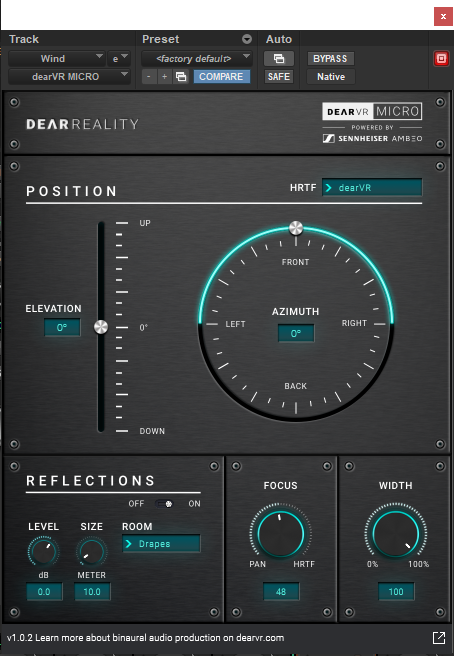
For the wind heard in the clip I took some pink noise and filtered out most of the high and high mid range frequencies, which makes the pink noise sound like wind, I also had a bell at around 300 Hz, I had some automation that I set to raise the gain of this band up and down randomly throughout the clip, this was to make the wind sound a bit more dynamic.
I then applied the dear VR Micro plugin to binauralise it, I turned the wideness all the way up, and kept the Azimuth setting set to the front as I didn't want the wind ambience to be focused to the left or right.

City Ambience:
I took a distant city ambience recording from SoundQ as the city is visible in the video and I wanted some sort of distant ambience for it, I set the width quite high as the city takes up a lot of space on screen and is very large, I also did some automation on this plugin to match where the city was in relation to the character and where they are facing.

Pool Sound:
one of the most important sounds is the pool, I recorded this at Nathan Gs' house, we recorded his jacuzzi, I used the VR handheld recorder to record the sound of a pool, we had it set to record to a binaural format for this, I imitated the turning of the character to sync my movement with the characters, and therefore sync the location of the pool in the binaural recording.
Unfortunately we didn't have a wind filter on the microphone so there was a lot of wind in the recording, I was able to fix this using EQ, first I did a huge low cut, removing most of the frequency content below around 150 Hz, I also used a bell to add an additional cut more focused in the 100 - 200 Hz range, as the wind was really loud here, I also used a bell to do a slight cut at around 1k, this seemed to get rid of most of the wind, I then used a bell to boost around 2.5 kHz to bring out the sound of the water in the recording, and finally added a high cut to get rid of some very high harsh frequencies.
I also used a compressor to equal out the dynamics of the recording, this was because the sounds of the water in the jacuzzi were still too quiet, so I used a compressor to bring those sounds out. I set the threshold really low, with a ratio of about 5:1, with a very fast attack and decently fast release, I then used the gain setting to raise the volume of the compressed signal.

Tree and Bush:
This was made from a recording of a bunch of tape in a box being shuffled around, it was recorded using a Rode NTG2, it was done to simulate the sound of both the leaves of a tree that can be seen in the clip, and a bush that is also seen in the clip, I applied different proccessing to these recordings to make them seem different.

For the tree I first used Pitch II to pitch down the recording, I pitched it down by 10 semitones, this was to make the sound a bit bigger and to help differentiate it from the sound of the bush, I then applied an EQ, first a low cut at around 250Hz, as pitching down added a lot of frequency content in the lower frequencies and it was getting quite muddy, I then boosted the mid and high mid range to make the sound more like leaves. I then put the Dear VR Micro plugin on the mono recording to binauralise it, since its a mono recording I cant change the wideness on the plugin, but I didn't want to for both the tree and bush as they aren't big objects within the clip, I also automated the Azimuth to match where the tree was in the video.


The bush was processed in the same order, I had Pitch II pitch shifting the sound up by 8 semitones, then for EQ I had a low cut at around 150 Hz as although I pitched the sound there was still some muddiness, I had a cut at around 700 Hz as this made it sound a bit less like just tape and resulted in a sound closer to a bush, I also did this by boosting between 2k and 3k, this was to get the sound of the "leaves" moving, finally I applied a shelf to cut frequencies above 9 kHz as there was a lot of high frequencies and sibilance because I pitched up.


Car Beep:
This was a recording I took of a cars horn, It was a stereo recording done using the VR Handheld Recorder, I first applied EQ, there was a lot of wind in this recording too, so I applied two bells to cut the parts in the low frequency range where the wind was very present, I also did a high cut as I wanted to make it sound a bit distant, so since higher frequencies travel less distance than lower frequencies, I cut some of the high end for this effect of distance. I applied delay to this sound as I thought a short delay with minimal amounts of feedback added more to the sound of the car horn being decently distant. Finally I binauralised this recording using Dear VR Micro, with the main focus being the HRTF, I made it slightly wide and turned down the elevation to match where the road would be in the video.

Clothing Movement:
I recorded my classmate moving his arm in sync with the character in the video using the 3DIO Binaural Microphone, which was going to a preamp and then a handheld recorder, I applied a compressor as the start of the movement was a lot louder than the end of the movement as the characters arm comes down, I set the threshold extremely low, this was mostly because the recorded sound itself was very quiet, with a ratio of 7:1, very quick attack and quick release, I then used the gain setting to bring up the volume of the compressed signal, this made the end of the movement more equal in volume to the start. I then applied an EQ, I applied a low cut to get rid of low end muddiness, I also did a cut at 300 Hz, as my classmate makes a noise unintentionally, it was very focused around 300Hz, I also did a light dip between 10k and 20k for the same noise.


Layered slab/concrete footsteps:
For these footsteps, I recorded my classmate walking on two pieces of slab on top of one another, they were recorded with a Rode NTG2, it was also layered with some footsteps I found on SoundQ. I cut the the recordings up into each footstep, put them in time with the video, I boosted the ones that were a bit too quiet, but not too much as the compressors on each channel would help out with the dynamics later on.
First I applied an EQ to my recorded footsteps, I cut a lot of the lows/low mids and boosted around 2 kHz, this is because I wanted the footsteps to be very clicky, the compressor then was applied, the threshold was very low, with a ratio of about 7:1, a very fast attack and fast release, and some gain on the compressed signal at the end, this brought the level of the quieter footsteps closer to the level of the louder ones. I then of course used Dear VR Micro to binauralise the footsteps, since its mono theres no way to change the width but for footsteps that is unnecessary, I set the elevation to 90 degrees, as this is where the players feet are located and where the sound of their footsteps would be coming from, I then made the focus entirely on the HRTF to help give the impression that these footsteps are coming from where the players feet are.
I applied almost the exact same processing to the footsteps from sound Q, exact same compressor and Dear Vr Micro settings, however the Compressor was first in the chain as I noticed that applying my EQ after the compressor was bringing out a lot of unwanted noise, but switching the positions of the EQ and Compressor fixed it, I also decided to cut around 2 kHz instead of boosting, as the footsteps became a bit too clicky when i boosted this frequency on these footsteps.


Wood Footsteps:
I recorded my classmate walking on a wooden surface with a Rode NTG2 for these footsteps, I again used clip gain to raise the volume of certain footsteps that were too quiet.
First I applied an EQ, a small low cut cutting very low sub frequencies, then big boosts at around 70 and 400 hertz, and a cut at around 2.5 kHz, this was all to make the footsteps less clicky, as the footsteps sounded as if the character was walking on tiles or marble, so the cut got rid of the "clickiness" and the boost added a lot more body to the footsteps.
I applied Dear VR Micro with the same settings as applied onto the other footsteps.

Reverb:
below is the reverb I had created for this project, I made the reverb quite short by turning the time setting down to around half a second, as the character isn't in a location that would have a long reverb tail.
I also put enabled a low cut setting and set it at about 67 Hz to avoid muddiness in the very low frequencies.

Master Channel:
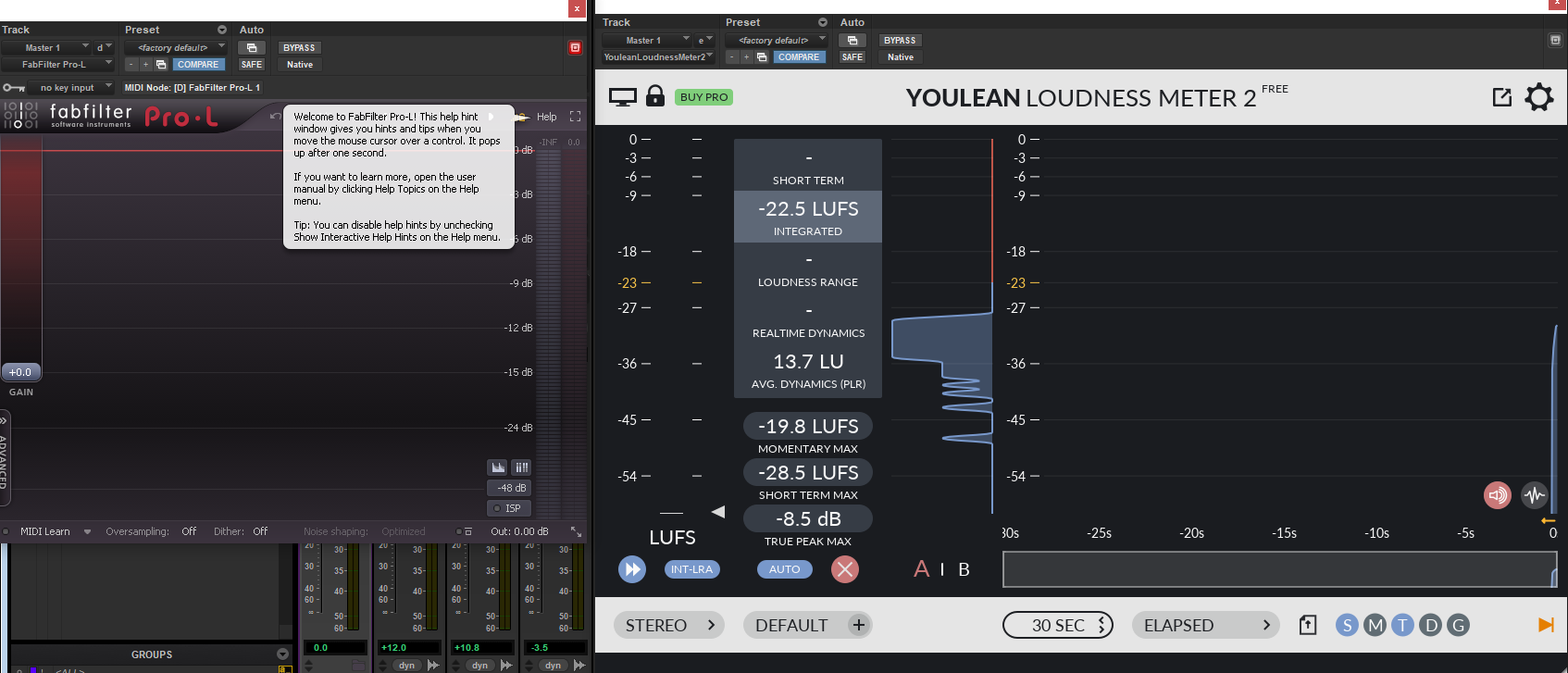
I applied a limiter to the master to make sure nothing exceeded 0db, I also had youlean loudness meter to measure my LUFS, as my target LUFS value was -16 with a leeway of 0.9db, I managed to get within this leeway before bouncing the project along with my stems for Ambience, sound effects and foley.
Click below to be linked to my other projects outside of my main artefacts, or to be taken back to the home page.